How to Write Better AI Prompts: A Practical Guide
Most people write prompts the way they'd text a friend — a quick, vague request — and then wonder why the AI's answer is generic. The good news: prompting is a learnable skill with a small number of rules, and the difference between a lazy prompt and a well-built one is night and day. This guide gives you a repeatable framework, seven techniques that genuinely work, and real before-and-after examples you can copy today.
The anatomy of a great prompt
A weak prompt asks for a thing. A strong prompt specifies a thing. The fastest way to level up is to stop thinking "what do I want" and start thinking "what would I need to tell a smart new hire who has never met me." That means five parts:
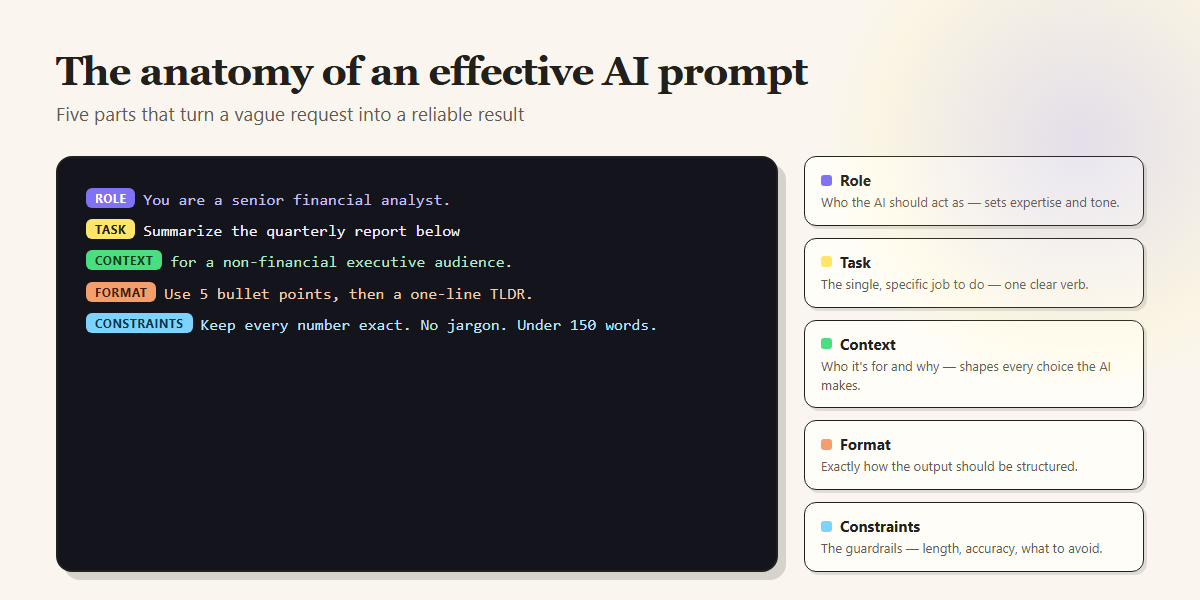
You won't need all five every time. A quick rewrite might only need a task and a constraint. But when an answer comes back wrong, it's almost always because one of these five was missing — and adding it fixes the output faster than any amount of re-rolling.
The five building blocks (with examples)
1. Role — who the AI should be
Telling the model who to act as sets its vocabulary, depth and priorities. "Act as a senior copy editor" gets you sharper feedback than a generic request, because you've told it which lens to use.
2. Task — one specific job
The single biggest cause of muddy answers is asking for several things at once. Give the model one clear verb — summarize, rewrite, compare, debug — and if you truly need multiple outputs, number them explicitly.
3. Context — who it's for and why
The same task produces wildly different output depending on the audience. "Explain compound interest" to a 10-year-old and to a finance grad are different jobs. Give the model the audience, the goal, and any facts it can't guess.
4. Format — how the output should look
If you want a table, ask for a table. If you want five bullets and a TLDR, say so. Models are excellent at following format instructions and terrible at guessing them.
5. Constraints — the guardrails
Length limits, accuracy requirements, tone, and what to avoid. "Under 150 words," "keep every number exact," "no marketing clichés" — each constraint removes a way the answer can go wrong.
Grab 50 ready-made prompts, free
Every prompt in our free pack is already built with role, task, context, format and constraints. Copy any one, or import the whole set into PromptDock.
See the 50 free prompts →Seven techniques that actually work
Beyond structure, a handful of techniques reliably raise output quality. These aren't gimmicks — they're the ones that survived contact with real work.
01 Show an example (few-shot prompting)
If the format matters, give one example of input → output before your real request. Models pattern-match beautifully. "Here's how I want product names turned into taglines: [example]. Now do these five: …" beats any amount of description.
02 Ask it to think step by step
For reasoning, math, or multi-step problems, add "work through this step by step before giving the final answer." It measurably reduces errors because the model reasons on the page instead of leaping to a guess. For a final deliverable, follow with "then give only the final version."
03 Let it ask you questions first
End a complex prompt with "before you answer, ask me up to 3 questions if anything is unclear." This flips the model from guessing to gathering — and the questions it asks often reveal what you forgot to specify.
04 Give it a way to say "I don't know"
Models hallucinate when they feel forced to answer. "If you're not sure, say so and tell me what you'd need to be certain" cuts confident-but-wrong answers dramatically — especially for facts, citations and numbers.
05 Iterate, don't restart
Your first output is a draft, not a verdict. "Good — now make it 30% shorter and more direct" gets you further than rewriting the whole prompt. Treat the chat as a conversation with an editor.
06 Use variables for the parts that change
The best prompts are templates. "Write a cold email to {{name}} at {{company}} about {{offer}}" is one prompt you reuse forever, filling the blanks each time — instead of rewriting from scratch. (This is exactly what a prompt manager's fill-in fields are for.)
07 Ask for options, then choose
"Give me 5 headline options ranging from safe to bold, and mark the two you'd test first" uses the model's real strength — volume and range — while keeping the judgment yours. One perfect answer is rare; five good ones to pick from is easy.
Seven mistakes that quietly ruin prompts
- Being polite instead of specific. "Could you maybe help me with something?" wastes a turn. Lead with the task.
- Burying the ask. Put the actual request first or last, not in the middle of a paragraph the model may skim.
- Asking for everything at once. One prompt, one job. Chain follow-ups instead of stuffing.
- No format instruction. Then complaining the answer is a wall of text you asked for.
- Assuming it remembers. In a new chat it knows nothing about you. Re-supply the context that matters.
- Accepting the first draft. The magic is usually in the second and third iteration.
- Rewriting the same prompt daily. If you've typed a prompt more than twice, save it. Which brings us to the part almost every guide skips.
Prompts by profession
The framework is universal, but the prompts that matter depend on your work. We've built free, copy-ready packs — every prompt already structured with the five building blocks above — for the roles that get the most from AI:
The part nobody tells you: reuse
Here's the uncomfortable truth about prompt writing: the skill only pays off if you don't throw the prompt away. Most people write a great prompt, get a great answer, and lose it in their chat history forever — then rebuild it worse next week.
The fix isn't a better memory. It's a prompt library that lives where you work. That's the entire idea behind PromptDock: you save a prompt once, then type // in any AI chat — ChatGPT, Claude, Gemini, Perplexity and more — to search your library and insert the right prompt in a keystroke. Templates with {{variables}} fill in the blanks as they insert. Everything is stored locally on your device, no account required.
Learning to write good prompts makes each answer better. Saving them makes every future answer better, for free, without the writing tax. Do both.
Put this into practiceType // to insert your best prompts — in every AI chat
Free to start, no account, 100% local. Every install gets all Pro features free for 7 days.
Add PromptDock to Chrome →Frequently asked questions
What makes a good AI prompt?
A good prompt gives the model five things: a role (who to act as), a single specific task, the context (who the output is for and why), the desired format, and constraints like length and accuracy. Vague prompts get vague answers; specific prompts get usable ones.
Is prompt engineering still worth learning in 2026?
Yes. Newer models are more forgiving, but the gap between an average prompt and a well-structured one is still large for anything that matters — accuracy, format, tone and consistency. The skill shifted from tricks to clear specification, but it's still the highest-leverage thing you can improve.
Do the same prompts work in ChatGPT, Claude and Gemini?
Mostly, yes. This framework is model-agnostic. Each model has quirks, but a well-structured prompt works across ChatGPT, Claude, Gemini and Perplexity — which is why keeping one reusable library across all of them saves so much time.
How do I save prompts so I don't rewrite them?
Store them in a prompt manager rather than a notes doc. PromptDock lets you type // in any AI chat to insert a saved prompt instantly, with fill-in-the-blank variables for the parts that change — so you write the prompt once and reuse it forever.